For lawyers and court-appointed experts
From loose PDFs to one numbered bundle.
CourtMerge merges your exhibits, numbers and labels every page, puts a clickable index in front of them and compresses the result into something you can actually file. Without a single document leaving your computer.
Three complete case files free. No account, no email address, no card number.
Not one document leaves your computer. No account, no cloud, no API key. Reading, linking and merging happen entirely locally — CourtMerge makes no network call at all while doing so.
Twenty loose PDFs, one finished bundle
The whole thing in 1 minute.
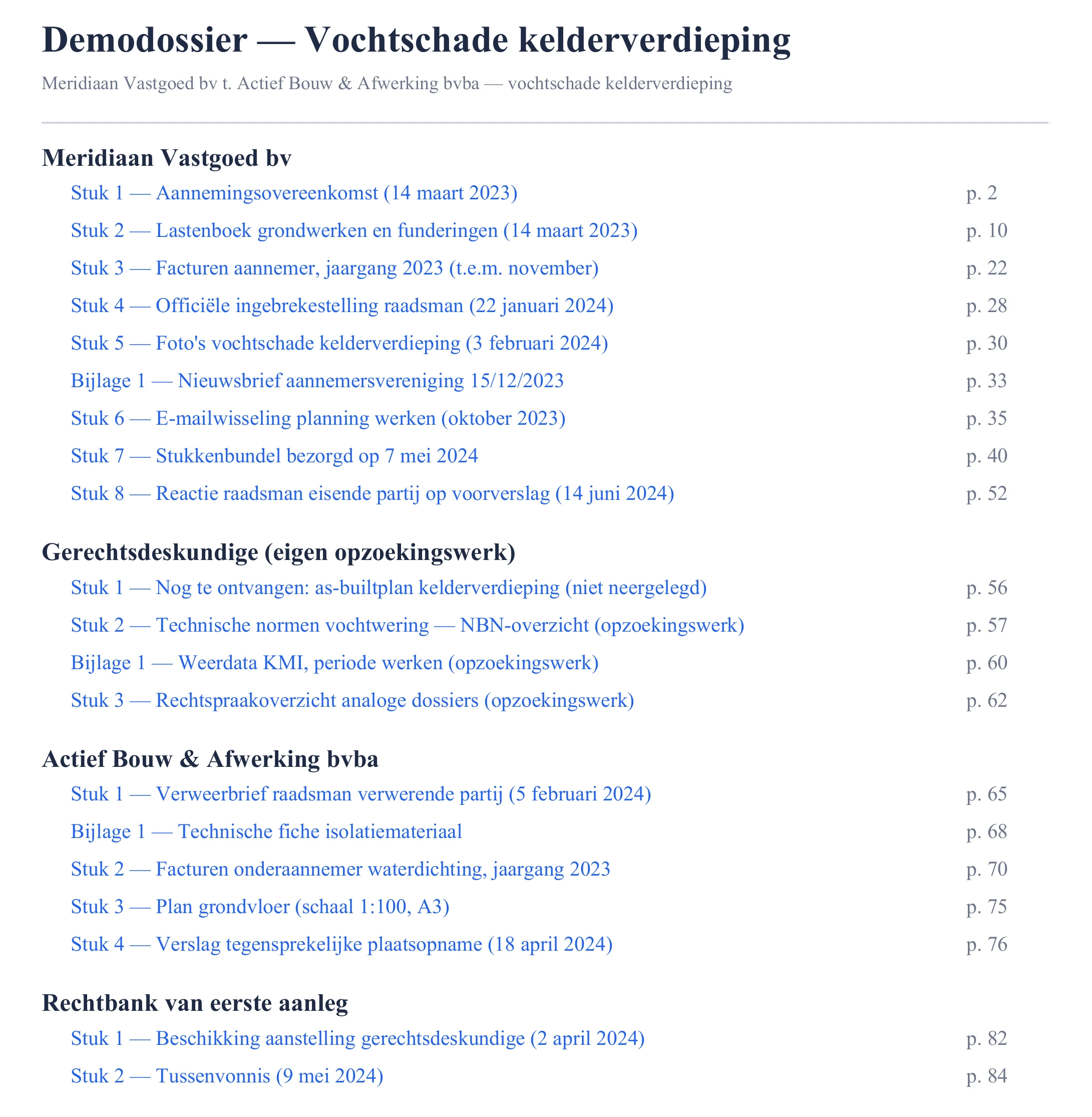
A 2.3 MB pdf, 88 pages, with index, labels and bookmarks — the actual output for a made-up sample case, not a mock-up.
How it works
-
1
Point it at your case folder
CourtMerge walks through every subfolder, finds the PDFs and already guesses from the folder structure which party each file belongs to.
-
2
Check the list of exhibits
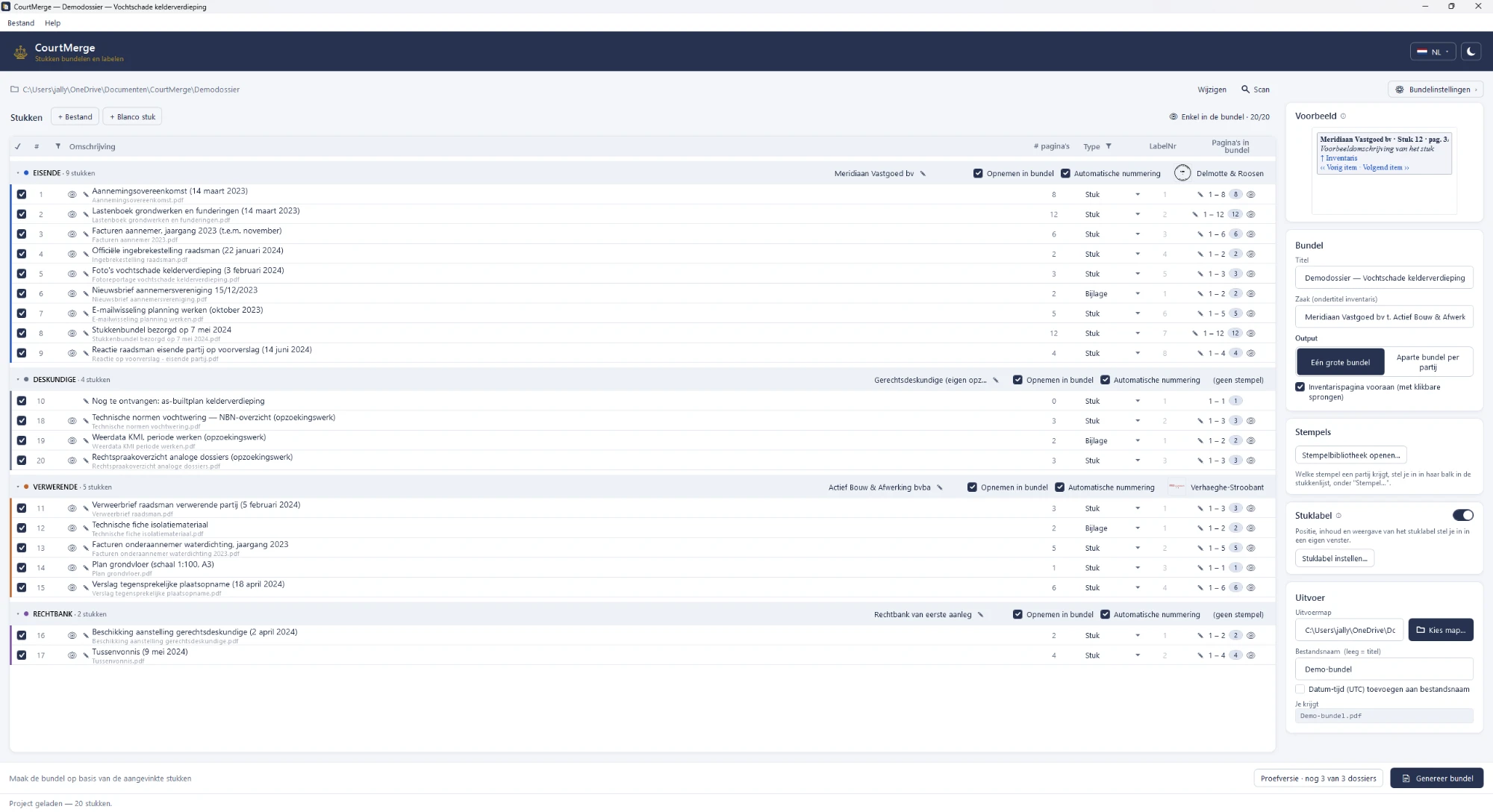
Party, exhibit number, description and page range are all edited in one list, grouped by party. The bar above each group holds that party's colour, whether it goes into the bundle, and which stamp it carries. One PDF that holds exhibits 1 to 6 is split back out by setting the page ranges.
-
3
Generate the bundle
Every page gets its label, the clickable index goes in front, and the bookmarks are grouped by party. One bundle, or one per party.
What it looks like
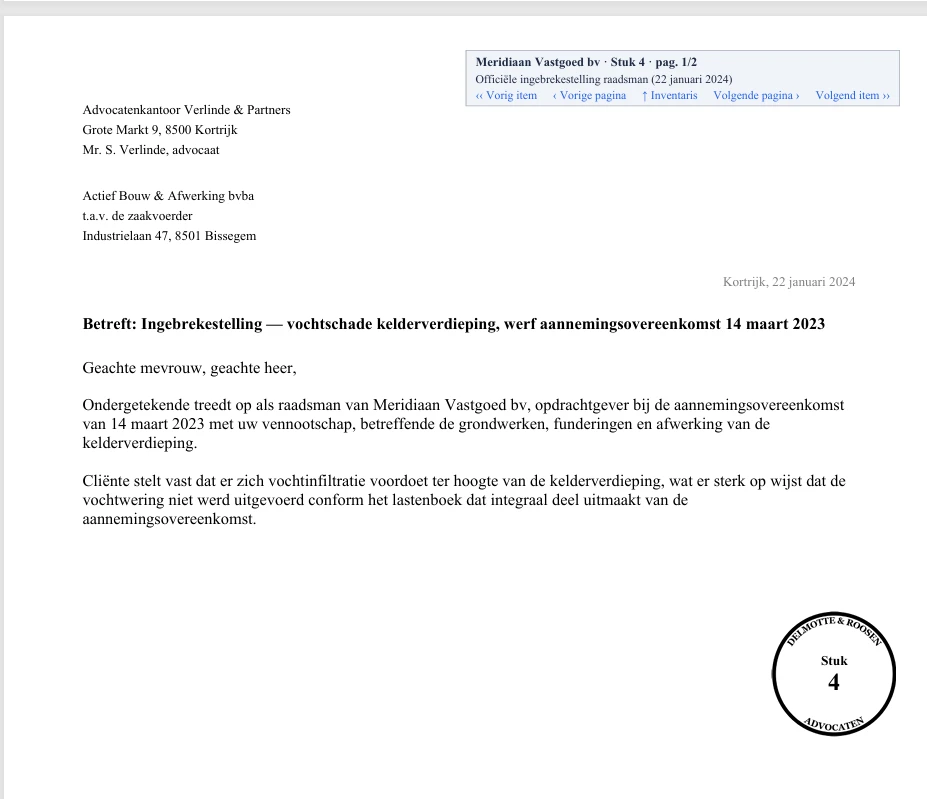
The application itself, and the bundle that comes out of it.
Your stamp, without the paper
Scan the stamp sitting on your shelf. CourtMerge straightens it, crops it to the ink and puts it on the first page of every exhibit.
What it does
Clickable index
At the front of the bundle, with a link to every exhibit. Plus PDF bookmarks grouped by party.
A label on every page
CLAIMANT PARTY · exhibit 3 · p. 2/7, with a jump back to the index and on to the previous or next page.Your office stamp
Your own stamp, scanned or built from a template, on the first page of every exhibit and per party, with the exhibit number inside it. Here is what that looks like.
One bundle or one per party
You pick the title and the split. Whatever the court or the procedure asks for.
Compression before sending
Three presets: smallest file, recommended or highest quality, so the bundle gets through the filing system. Resolution, JPEG quality and greyscale stay adjustable on their own.
Save and reopen a project
A case file keeps all its settings and the complete list of exhibits. Add one exhibit later and regenerate.
Four languages
Dutch, English, French and German, switchable at the top of the window without a restart. A fresh install follows your Windows language.
Portable version
One exe, no installation, no admin rights. Usable on a managed office PC too.
Entirely local
Reading, linking, merging and labelling all happen on your own computer.
Price
About €12 a month if you spread it over a year. And it never stops working.
- The complete product — there is no limited edition
- Your version keeps working forever
- Updates included for as long as there are updates
- No VAT — Belgium's small-business exemption scheme
- No account, no activation server, no expiry date
- No subscription. You pay once.
Rather try it first? The first three case files are free, with the complete product and without registering. Within such a case file you rebuild as often as you like.
Frequently asked questions
What does “three case files free” mean?
In CourtMerge you make one project file per case. The first three such cases are free, without a time limit and with the complete product — no watermark, no disabled features. Within such a case you may rebuild the bundle as often as you like: reorder exhibits, adjust labels, try a different compression. That does not count. Only a fourth case calls for a licence.
There is no clock on it. Your trial does not run out while you wait for a case to use it on.
Can I use my own office stamp?
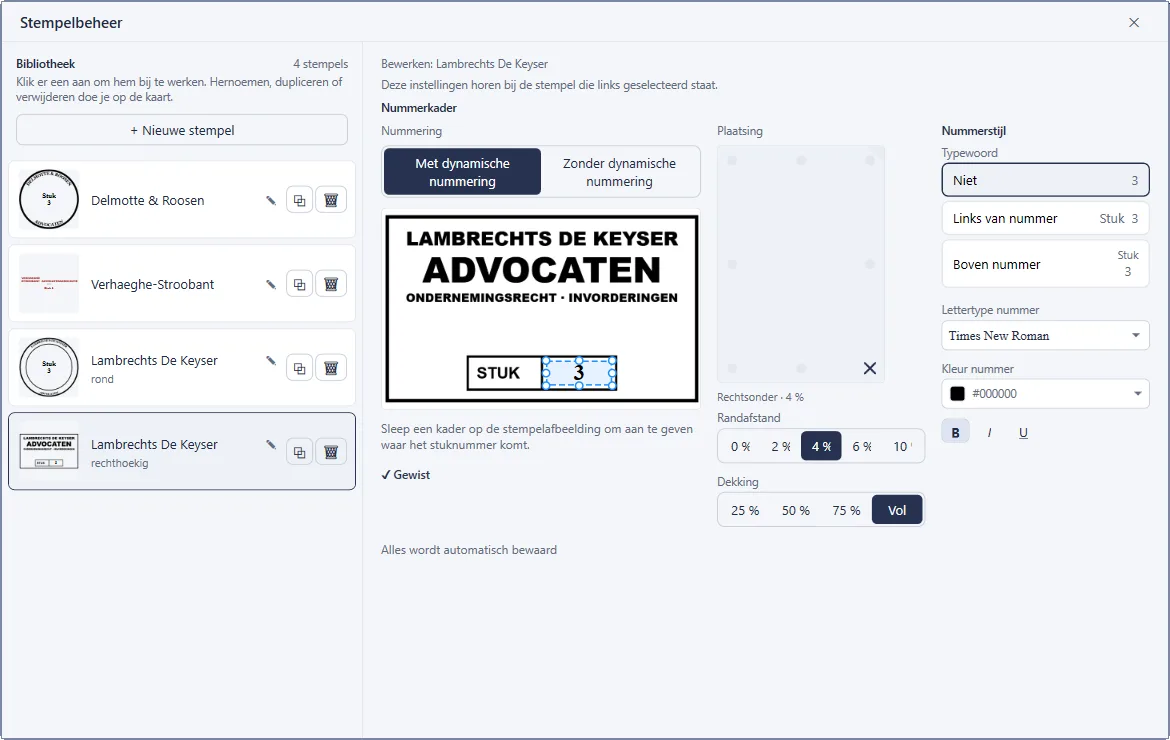
Yes. Build one from one of the five templates: a round or rectangular stamp drawn from your office name, with the ring, the ink colour and the wear in your hands. Or bring in a scan of your real stamp, through the file picker, pasted from the clipboard, or dragged in from Explorer. CourtMerge straightens that scan, crops it to the ink and makes a white scan background transparent, so the stamp does not cover the text underneath.
You fill your stamp library once; every case file shares it. An office has one stamp, after all, not a separate one per case. CourtMerge copies the image when you bring it in, so the original may move or disappear afterwards without breaking anything.
The exhibit number goes inside the stamp, the way you would write it by hand: you drag one frame over the number already on the scan, and CourtMerge erases that number and centres the new one in the same place.
 Enlarge
What if that corner of the page is already taken?
Then the stamp moves. CourtMerge checks, page by page, whether the chosen corner already carries something, such as text, a signature or another firm's stamp, and then tries the remaining seven placements clockwise, if you allow it. The preview before generating says where the stamp ended up, and why.
That judgement is calibrated against 1592 real filed exhibits. The corner holding the page label is blocked for the stamp, and the other way around.
Do I get updates?
Yes, and they are included. There is deliberately no period attached: I am not promising you twelve months of development that I then have to deliver, and I am not putting a clock on your licence. For as long as improvements appear, you can download them.
What may happen one day is a next major version that costs money. I would rather say that now than in two years. Your current version keeps working in that case — you lose nothing, you would at most buy something new if it looks worth it to you.
What if it is ever discontinued?
The version you buy keeps working. There is no activation server that can be switched off and no expiry date that passes. Even if no update ever appears again, your bundle still builds tomorrow.
Do my documents leave my computer?
No. Reading, linking, compressing and merging happen entirely locally. CourtMerge makes no network call while doing so, not even to an AI service. That is a deliberate choice, not a limitation.
Is this allowed on a managed office PC?
Yes. Besides the installer there is a portable version: one exe that runs without installation and without admin rights. You put it on your desktop or on a network drive and start it.
What computers does this run on?
CourtMerge is a program for Windows. On a phone, tablet or Mac you can download the file, but you cannot open it. You need Windows 10 or later, 64-bit. Nothing else has to be installed — .NET is inside the program itself.
My browser and Windows show a warning.
That is expected, and there are two of them. CourtMerge does not carry a code signing certificate, so neither program can check the publisher. They are about how well known the file is, not about what is in it.
At the download, your browser warns that the file isn't commonly downloaded and that the publisher is Unknown. Choose Keep anyway there — in Edge that choice sits under the arrow next to Delete.
When you open it, Microsoft Defender SmartScreen shows Windows protected your PC. Click More info and then Run anyway. Windows remembers this for this file; a later version brings both messages back.
Do I get an invoice?
Yes, directly from Joachim Ally, trading as Ronagold, as soon as your order is complete. No VAT is charged — Belgium's small-business exemption scheme. Order as a business and you get the invoice electronically via Peppol.
How do I receive my licence?
By email, in two ways at once: as a .cmlic file attached and as a
block of text in the message itself. You paste that block into the app.
Handy when your firm's mail filter strips attachments.