Download CourtMerge
CourtMerge is a program for Windows. On a phone, tablet or Mac you can download the file, but you cannot open it.
You download the complete application. Three case files are free; after that you need a licence. No account, no email address, no card number.
Version 1.3.3 · released on 19 September 2026 · installer 58.4 MB · portable zip 82.0 MB
Your browser and Windows warn you
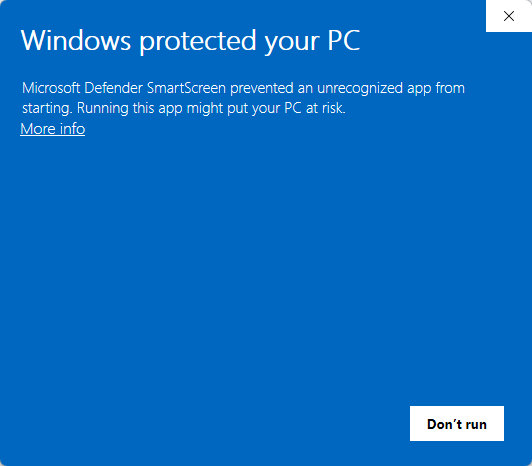
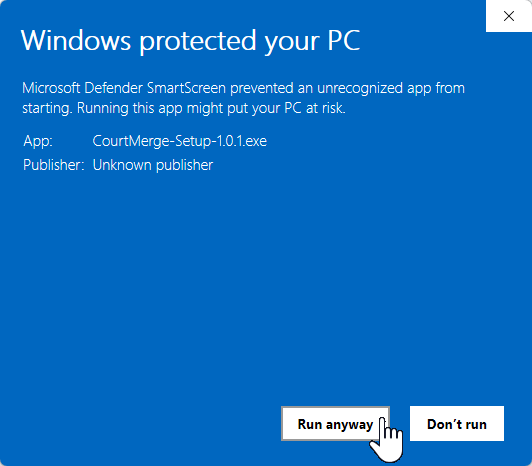
You get two warnings in a row: first from your browser as the file comes down, then from Windows when you open it. CourtMerge does not carry a code signing certificate yet, and without one neither program can check who publishes the file. So both report the publisher as unknown. That is about how well known the file is, not about what is in it. If such a certificate is added later, both warnings disappear on their own.
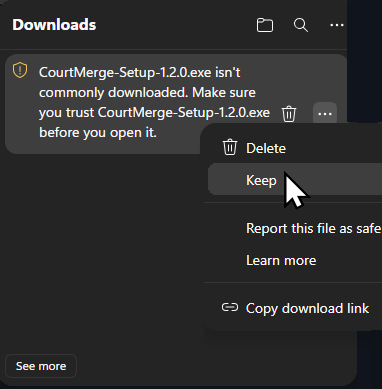
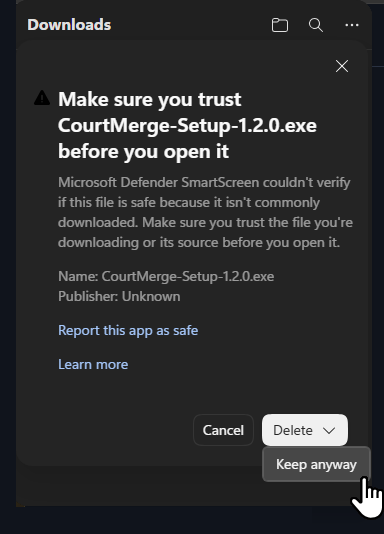
This message comes from your browser, right at the download. The file isn't commonly downloaded and the publisher is Unknown. Click ⋯ next to the file and choose Keep; the browser then asks you to confirm once more — choose Keep anyway there.
This message comes from Windows itself, when you open the downloaded file. Windows shows it because the file is not known yet. Click More info and then Run anyway.